Open Source · Built with Go

Your PostgreSQL
AI-Powered CLI

A terminal UI for PostgreSQL with multi-LLM AI assistant, explain plans, index suggestions, and a keyboard-driven interface — all powered by pgx.

$ go install github.com/DachengChen/paiSQL@latest
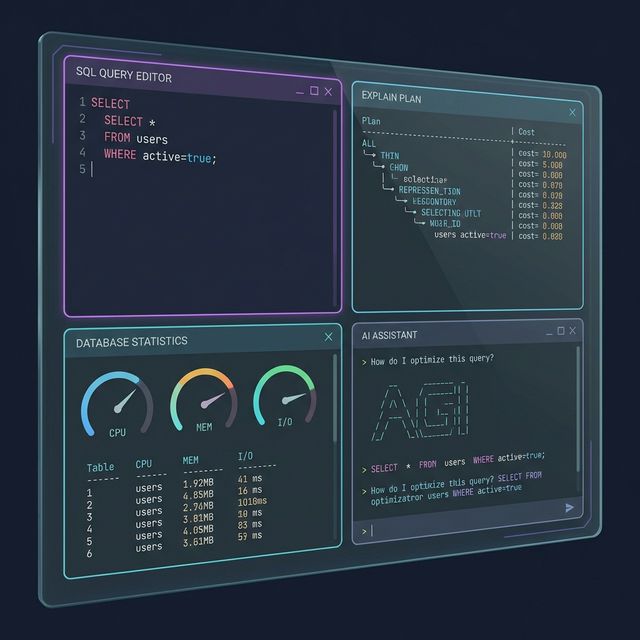
paiSQL Terminal UI showing SQL editor, explain plan, database statistics, and AI assistant panels

Everything you need in a PostgreSQL CLI

Built from scratch with Go and pgx — no psql dependency required.

🤖

Multi-LLM AI Assistant

Chat with OpenAI, Anthropic, Gemini, or local Ollama models — directly inside the terminal. Ask questions, generate SQL, and get optimization tips.

📊

6 TUI Views

SQL editor, Explain plan, Index suggestions, Database statistics, Activity log, and AI chat — each in a dedicated tab, switchable with a keypress.

🔌

pgx-Powered

Connects directly to PostgreSQL via the Go pgx driver. No psql binary needed, no shell dependency — just a pure Go connection.

🔒

SSH Tunnel

Built-in local port forwarding for remote databases behind firewalls. Configure host, port, key, and passphrase right in the TUI.

⌨️

Keyboard-Driven

Tab switching, command mode, jump mode, help overlay — navigate everything without reaching for the mouse. Vim-style and psql-style commands.

Async Everything

Database queries and AI operations run asynchronously and never block the UI. Keep browsing while your query executes.

Six views, one terminal

Switch between views with Tab or number keys. Every view is purpose-built.

SQL Editor

Write and execute queries with \dt, \di, \dv, \d <table> meta-commands. Results render in a beautifully formatted table.

  • psql-compatible meta-commands
  • Variable substitution with \set
  • Scrollable result tables with horizontal/vertical paging
  • Text wrapping toggle with Ctrl+W

Explain Plan

Visualize query execution plans with EXPLAIN ANALYZE output. Spot sequential scans, index scans, and cost estimates at a glance.

  • Formatted EXPLAIN ANALYZE output
  • Identifies slow operations
  • Scrollable plan tree

Index Suggestions

Get AI-powered suggestions for creating indexes to optimize your queries. Understand which columns to index and why.

  • AI-powered index recommendations
  • Based on your actual query patterns
  • Copy-ready CREATE INDEX statements

Database Statistics

Monitor your PostgreSQL instance with real-time statistics — table sizes, index usage, cache hit ratios, and more.

  • Table and index sizes
  • Cache hit ratios
  • Active connections
  • Transaction rates

Activity Log

Tail your query activity in real time. See every query executed, its timing, and any errors — all in a live-scrolling log.

  • Live query tail
  • Execution timing
  • Error highlighting
  • Auto-scroll with manual override

AI Assistant

Chat with your choice of LLM directly in the terminal. Ask it to explain queries, suggest optimizations, or generate SQL for you.

  • Multi-provider: OpenAI, Anthropic, Gemini, Ollama
  • Context-aware SQL generation
  • Schema-aware recommendations
  • Toggle between Chat and SQL mode with F2

Up and running in seconds

Install with Go or download a pre-built binary for your platform.

Using go install

The easiest way if you have Go installed.

# Install the latest version
go install github.com/DachengChen/paiSQL@latest

# Launch paiSQL
paisql

Download Binary

Grab a release from GitHub for your platform.

# Example: macOS Apple Silicon
curl -sSL https://github.com/DachengChen/paiSQL/releases/latest/download/paisql_darwin_arm64.tar.gz | tar xz
sudo mv paisql /usr/local/bin/
🍎 macOS (Apple Silicon)
🍎 macOS (Intel)
🐧 Linux (x86_64)
🪟 Windows (x86_64)

Choose your AI engine

Swap providers with one config change. Cloud or local — your call.

🧠

OpenAI

GPT-4o, GPT-4o-mini

🎭

Anthropic

Claude Sonnet, Opus

💎

Google Gemini

Gemini 2.0 Flash, Pro

🦙

Ollama

Llama 3.2, CodeLlama

Local · Free
🚀

Antigravity

Google OAuth login

Free

Navigate at the speed of thought

Every action is a keypress away. No mouse required.

⌨️ Navigation

  • Switch view Tab
  • Jump to view 16
  • Jump by name /
  • Command mode :
  • Help overlay ?

📝 Editing & Execution

  • Execute query / send Enter
  • Toggle Chat / SQL F2
  • Scroll up / down Ctrl+K / Ctrl+J
  • Scroll left / right Ctrl+H / Ctrl+L
  • Toggle text wrap Ctrl+W

Ready to level up your PostgreSQL workflow?

Install paiSQL in seconds and start querying with AI by your side.